


Installation Guide
Rock Band 2 Deluxe requires a copy of vanilla Rock Band 2 and installed exports for Rock Band 1 and Lego Rock Band in order to run. We hope this is clear.
- PS3: BLUS30147 (USA)
- 360: 45410869 (USA)
Find your platform of choice below...
Select your platform.
Installing on PC, via RPCS3
Before you start, check out the Definitive RB3 PC Setup Guide. This covers everything, and mainly focuses on RB3, but it mostly applies to RB2 as well.
Download Rock Band 2 Deluxe if you haven't already
- Extract the
.zipfile. - Drag and drop the
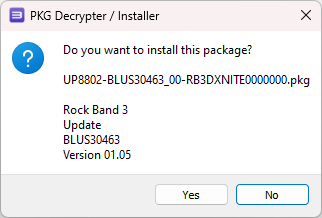
.pkgfile on top of the main RPCS3 window to install it. - Select
Yesto confirm.
Now we need to install the recommended settings...
- [Recommended settings] - These are the settings used for RPCS3's recommended specs.
- [Minimum settings] - These are the settings used for RPCS3's minimum specs.
Extract the contents of the desired zip file into your RPCS3 installation folder.
✅ Rock Band 2 Deluxe is now installed and ready to play!
Rock on!
Installing on PS3*
*RB2DX requires a modded PS3 console (CFW or HEN) in order to run.
Download Rock Band 2 Deluxe if you haven't already
- Extract the
.zipfile. - Copy the
.pkgfile to the root of a FAT32 formatted USB drive. - Remove it from your PC and plug it into the far right USB port on your PS3.
- On the XMB, navigate to Package Manager > Install Package Files > Standard.
- Install it just like any other package.

✅ Rock Band 2 Deluxe is now installed and ready to play!
You can play the game using the original disc or via a backup on your hard drive. Rock on!
Installing on Xbox 360*
*RB2DX requires a modded Xbox 360 console (RGH/JTAG) in order to run.
Install your copy of Rock Band 2 to the console's hard drive. This step is required.
- We recommend that you rename its
default.xextodefault_vanilla.xex, just as a backup in case you ever want to go back to vanilla.
Download Rock Band 2 Deluxe if you haven't already
- Extract the
.zipfile. - Copy the contents of it to where you have Rock Band 2 installed.
- You can do this via FTP or by putting the files on a USB drive and copying them using Aurora's file manager.
- Select
Yesto overwrite the files if it asks you to.
Before you launch the game for the first time, we recommend that you...
- Download the Rock Band 2 Deluxe cover art in Aurora.
- Hover over Rock Band 2 in your games list and press
Y. - Scroll all the way down, then scroll left until you get to
Download Cover. - Download the one uploaded by
jnack, it should be all the way at the bottom. - You can also rename the game in the list to Rock Band 2 Deluxe if you so choose.
✅ Rock Band 2 Deluxe is now installed and ready to play!
Installing on PS2 (Custom Edition)*
*RB2DX requires a PS2 that runs backups (Free McBoot, FreeDVDBoot or a modchip) in order to run.
Download Rock Band 2 Deluxe (Custom Edition) if you haven't already
Before you start, Custom Edition has no charts. You'll need to convert your own songs and build the PS2 disc using RB2DX Disc Builder.
Build the disc
- Extract the builder and run
RB2DX Disc Builder.exe. The first start takes a good twenty seconds while it unpacks itself, with nothing on screen until the window appears. - On the Setup page, fill in the folders it asks for, starting with the Custom Edition folder you extracted.
- Press Download what's missing to fetch the tools, then select
ps2str.exein the list and use Locate the selected tool... to point at your own copy. - Add the folders your songs live in, then on the Songs page scan and tick what you want.
- Once you are ready, go to the Build page and press Build the disc.
Playing it on a console
Copy the ISO to the console's hard drive or an MX4SIO SD card and launch it from Open PS2 Loader.
Playing it in PCSX2
PCSX2 will not boot the ISO the builder writes, though a real PS2 will, so have it save the disc's files and make the image with ImgBurn instead:
- Tick Also save the disc's files in a folder.
- Set the file system to ISO9660 + UDF with UDF revision 1.02, then write the image and load it in PCSX2.
✅ Rock Band 2 Deluxe is now installed and ready to play!
Rock on!